
Cocoons
Find your people. Build your Cocoon.
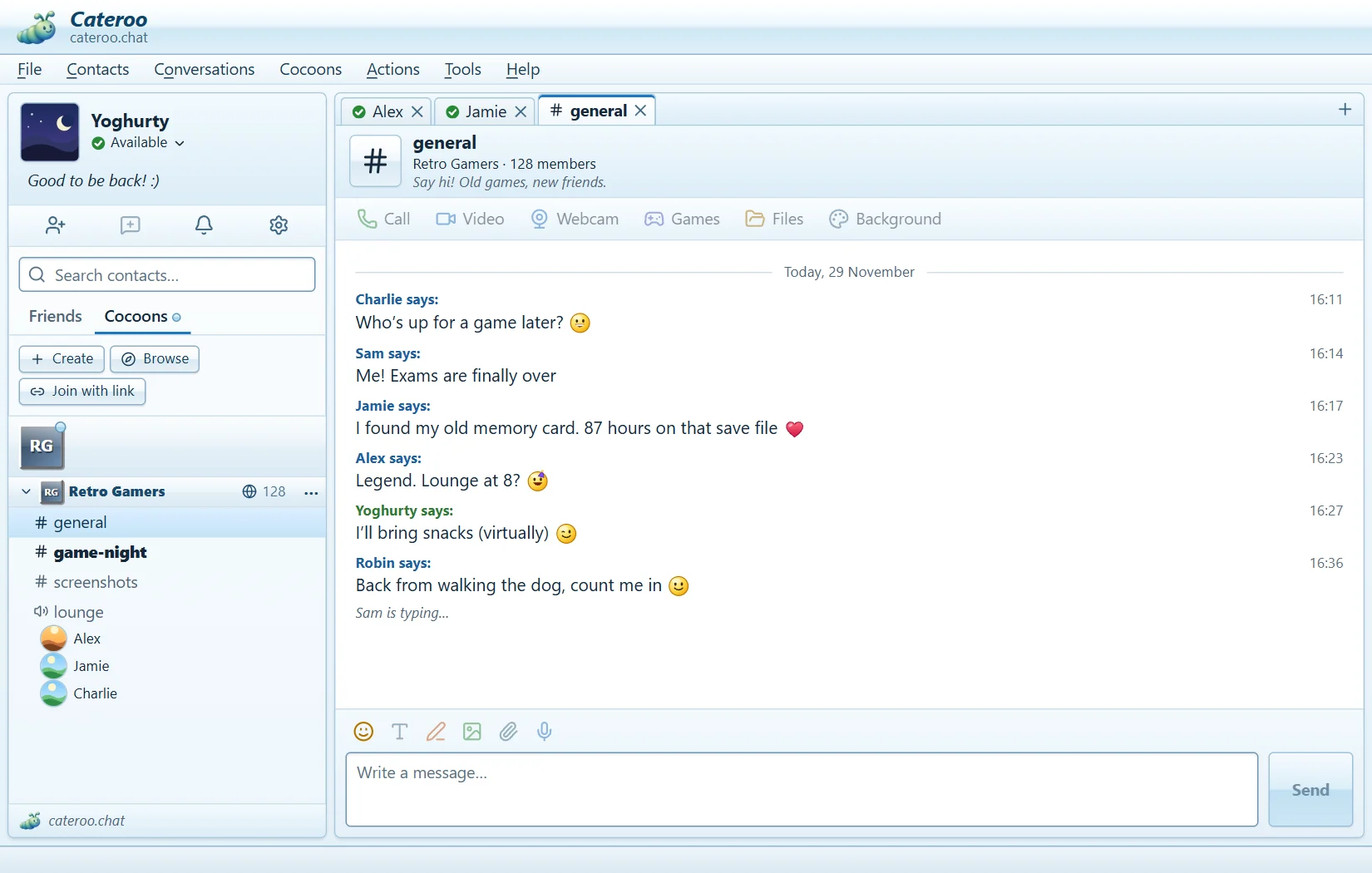
A Cocoon is a cosy space for a group: a few text channels to chat in, voice channels to hang out in, and the people who make it yours.

What’s inside a Cocoon
Every new Cocoon starts with a #general text channel and a lounge voice channel. Admins add more channels whenever they like.
- Text channelsTopics, plans, memes and screenshots, each in its own channel.
- Voice channelsClick a voice channel to join. Everyone can see who’s in there, and you can turn on your camera or share your screen.
- MembersSee who’s around. Mention someone with @ to get their attention.
- Quiet by defaultCocoons don’t buzz for every message, only when someone mentions you.
Public or private: you choose
You pick when you create a Cocoon. The difference matters, so here it is in plain words.
Public Cocoon
- Anyone with the link can join, and it can be listed in the Cocoon directory.
- New members can read earlier messages, so they can catch up.
- Text channels are not end-to-end encrypted. They’re protected in transit and by the server, and the Cateroo team can review reported messages.
- Voice and video in voice channels are end-to-end encrypted (beta).
- Best for: hobbies, fan clubs, open communities.
Private Cocoon
- Invite only: members join when an admin invites them.
- Members see messages from the moment they joined.
- Text channels are end-to-end encrypted, like your private chats. The server can’t read them.
- Voice and video are end-to-end encrypted too (beta).
- Best for: friend groups, families, study groups.
Cateroo always shows which kind of Cocoon you’re in, in the channel header and before you join.
Keeping Cocoons friendly
Communities need care. Cocoon admins get tools that the server enforces, so a modified app can’t get around them.
- Remove and banAdmins can remove or ban someone from the Cocoon and all its channels.
- Slow modeLimit how often people can post in a channel, from 5 seconds to 15 minutes.
- Raid protectionBrand-new accounts wait two minutes before joining a public Cocoon, and joins are rate-limited.
- ReportsAnyone can report a message, a person or a whole Cocoon to the Cateroo team, not just to its admins.
Coming later: moderator roles, custom permissions, timeouts and word filters. Everyone in a Cocoon follows the Community Guidelines.

Start your own Cocoon
- Open the Cocoons tabIn Cateroo, switch from Friends to Cocoons and choose Create.
- Name it and pick a kindGive it a name, a picture if you like, and choose public or private.
- Invite your peopleShare an invite link (public Cocoons) or invite friends directly.
- Make it yoursAdd text and voice channels, set a topic and turn on slow mode where you need it.